Friday, 6 January 2023

Machine Learning – why isn’t it everywhere?


“If we have data, let’s look at data. If all we have are opinions, 

let’s go with mine.”

Jim Barksdale


Let start with a basic, ML is not AI. Yes, Machine Learning (ML) is a type of artificial intelligence (AI) that involves the use of algorithms and statistical models to enable computers to improve their performance on a particular task through experience.


In ML, a computer is fed a large dataset and uses statistical analysis to identify patterns and relationships within the data. The computer can then use this knowledge to make predictions or decisions without being explicitly programmed to do so. If this is the case – then the question may well be, well why isn’t it everywhere?


ML poses many challenges to it being conducted and implemented within businesses, some of these challenges are:

  • Data Quality and Quantity: ML algorithms require large amounts of high-quality data to learn effectively. This can be a challenge because it is often difficult to obtain large amounts of clean, accurate, and relevant data for the question we are trying to answer.
  • Overfitting: Overfitting occurs when a ML model is trained too well on the training data and does not generalize well to new, unseen data. This can be a problem because the model will perform poorly when deployed in the real world or to changes that happen over time.
  • Feature Engineering: Is the process of selecting and creating the input features that will be used to train a ML model. The key to this is domain knowledge and expertise, which can be time-consuming and difficult to convey. 
  • Hyperparameter Tuning: ML algorithms have several hyperparameters that control their behaviour and performance. Finding the best values for these hyperparameters can be a challenge because it requires experimentation and evaluation.
  • Bias and Fairness: ML algorithms can sometimes perpetuate or amplify societal biases that are present in the training data. 
  • Explainability: Many ML models are considered "black boxes" because it is difficult to understand how they arrived at a particular prediction. This lack of explainability can make it difficult to trust and deploy ML systems in certain contexts.


Based on the above there are several reasons why companies may not adopt and use ML on a regular basis:


  • Lack of resources: Implementing ML can require a significant investment in terms of time, money, and personnel. 
  • Lack of expertise: ML requires specialized knowledge and skills, which may not be present within a company. 
  • Complexity: ML projects can be complex and require a significant amount of infrastructure and technical expertise to set up and maintain. 
  • Concerns about bias and fairness: ML algorithms can sometimes perpetuate or amplify societal biases that are present in the training data. 
  • Legal and regulatory issues: There may be legal or regulatory hurdles that a company must navigate to implement machine learning. For example, there may be concerns about data privacy or the ethical use of ML.
  • Lack of clear ROI: In some cases, it may be difficult to quantify the potential benefits of a machine learning project, which can make it difficult for a company to justify the investment.

Over the coming blogs, we’ll investigate these areas of concerns and how we can address some of these within the Oracle ecosystem. Looking at the how to’s to solve these complexities and how you can become a ML superhero within Oracle technology. 


Oracle has several tools and features that support ML, including Oracle Machine Learning (OML), Oracle Cloud Infrastructure (OCI) Data Science, and Oracle Autonomous Database (ADW).


OML is a suite of tools and libraries that allows users to build, train, and deploy ML models within the Oracle Database. It includes several pre-built machine learning algorithms and supports integration with popular open-source machine learning libraries such as scikit-learn and TensorFlow.


These can also be controlled through Oracle Analytics Cloud (OAC):


OCI Data Science is a cloud-based platform that provides a range of tools and services for data science and ML, including data preparation, model training, and model deployment. It also includes support for popular ML libraries and frameworks.


ADW is a fully managed database service that uses machine learning to optimize and manage itself, eliminating the need for manual tuning and maintenance. It includes support for in-database ML using SQL and Python.


As you can see we’ve got a lot of exploring and learning to do in 2023, and I’m grateful I’m able to help some people get started, and maybe help those who have started, look at it in a different way. 


Monday, 2 January 2023

Evolution is a truth

“It is a truth universally acknowledged,..”

Jane Austen, Pride and Prejudice


2022 was a year to both remember and forget. A year where personal lose went very deep, with my father passing, it marked that the last 4 years had been tough. In, 2019 we lost mum, 2 years of the pandemic took its toll on all of us, then 2022 my father…. So hopefully 2023 will be less painful in that sense. 
 
2022 isn’t all bad, we saw the return of in person conferences – and it was so good to have coffee and catch up. I personally had the pleasure of attending the Skywalker Ranch in San Francisco, meeting new people, and exchanging new ideas. There was the UKOUG event at the end of the year, returning to Birmingham – home to a great Christmas market. On a personal level, football (soccer to the USA audience) was in full flight, with an amazing county cup win, and continuing to grow the football analytics into ML as well as Graph technology. 
 
But this doesn’t answer that question, why are you blogging. Well, there is another great addition to 2022, that was the return/ fixing of the Oracle ACE program. It’s fair to say that the program itself has been on a journey, from very low points, to the very high of it returning to its roots. There have been some changes along the way, some will argue for the better and others saying they aren’t fair. Personally, I see them as evolution of a program, like all technology and processes, it’s adapting, maturing, and evolving. One of the changes was that blog’s written/ posted on your company website won’t count for points – it’s a contentious change to some – but it did make me rethink. I mean as it is, the blogs I write are often actually about how to or looking at the wider parts of ML/ AI. Thus, why not write these posts as external rather than as a company? Answer – there is no reason.  

2019 I stopped blogging, mainly to have more time with my Mum and care for my father, now that life has thrown it's curve balls, it's time to get back to it. Plus, I'm conscious that some still can't travel to conferences, so even though, my preferred approach to helping people is conferences, blogs absolutely have their place too.  

So, that’s why these blogs have come about, time to help expand who reads about Oracle ML and AI. No hidden agendas, no company posts, just simply feeding back to the community, hoping to engage more discussions and create new friendships. 
 
Wish me luck in 2023, it’s hopefully better than 2022, but also a new approach, an evolution into the writing market rather than the presenting market….

Saturday, 11 May 2019

Oracle ADW creating a ML user

Oracle Autonomous Data Warehouse has a number of features that make it a collaborative environment. No more silo’s or hiding your code in a cupboard, only to be lost or disregarded because it has too much dust on it!
One of those features is the ML Notebook. In this blog post we’ll show you how to create a ML user and perform some basic commands, in later blogs we’ll show you how to create machine learning models within the notebooks. 
Creating the User
Log into Oracle cloud environment
 Under the administration dashboard, select "Administration"
Left click on "Manage Oracle ML User"


In the following screen create a users name and email address to be used by the associated ML user. There is an option to create a password for the user, or have the system email the user and they can create their own password.

Once the user has received the email and logged in they will be presented with the ML home screen. Here the user can create new notebooks, schedule SQL queries or try some of the examples.

Left clicking on the "Notebook" enables the user to explore notebooks they have already created as well as creating new notebooks.
When you select new notebook, give the notebook a name and any comments about the notebook. 

You'll then be in the notebook. The Zeppelin notebook enables you to run SQL queries as well as document notes alongside the SQL. The notes are captured using the Markdown language. 

Monday, 6 May 2019

Kaggle Titanic and OAC

Data Science: How do I get started?
In this blog we’re going to show you how to do one of the Kaggle Introduction competitions without needing to learn a new language. 

Who’s Survived?

The competition we’re going to solve is the Titanic, in this we have 2 data sets, train and test. The train dataset has a labelled column, Survived, where 1 = Yes, survived and 0 = No, didn’t survive. To solve this, we’re going to use a Binary Classifier (Supervised Learning Model).

Step 1 – Acquire the Data: Navigate to Kaggle and download the data files from the Titanic Competition. 

 Step 2 – Loading the Data:Drag and Drop the files in Oracle Analytics Cloud to upload them as data sources. 


Step 3 – Enrich the Data: Once the data is loaded, open the data source and look to enrich the data. There are many areas to enrich, Passenger Title, Cabin Level and. Once enriched makes sure you click on “Apply Script”.
Open the Train Data Set: 
Creating the Feature “Title”
Right click on the name column and left click on Split. 
For the first split, use the “,” and increase the “Number of Parts” to 2.
On the new columns “Name Split 2”, Right click and select split again. This time split on “.”. This will create a new column with the Titles in. 

Family Size: 
Right click on “Parch” and select Duplicate. Right click on the new column created and left click on Edit. 
In the edit box, add together Parch, SibSp and 1 in the formula: #Parch + #SibSp + 1. Rename the column to Family Size.

Cabin Level: 
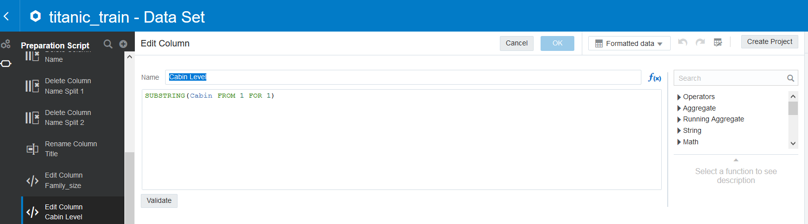
Right click on the column Cabin and left click on “Duplicate”. Right click on the new column created and left click on “Edit”. In the edit screen used the function SUBSTRING to extract the first letter from the cabin data. 

Note: SUBSTRING(<<Column>>, Starting Position, Number of characters to extract)

Step 4 – Augmented Analytics: Left click on “create project”, this will open a blank canvas. One the left-hand side are the data fields. Right click on “Survived” and select “Explain Survived”. 
The explain box will appear on screen and provide a high-level overview of the attribute “Survived”. Left click on the tick in the top right corner. This will indicate the graphs that you want to add to the Canvas. 
Left click on “Key Drivers of Survived”. This will present a number of key drivers towards to the variable “Survived”. Once you’ve selected your graphs, click on “Add Selected”.
This will use Oracle in-built machine learning algorithms to describe the attribute “Survived” and provided detailed visualisations that help to explain the attribute “Survived”.  

Step 5 – Training the model: Once we have explored the data we’re ready to build a machine learning model. On the home screen left click on “Create” and then “Data Flow”. 
The data flow is as follows:
1.    The training data source
2.    Remove any columns not required in the model
3.    Train the Binary Classifier
4.    Save the model 
In this example we’ve built a Neural Network Supervised Learning Model Ensure you select the correct column that you want to predict (“Survived”) and “0” for the positive class in Target (Most Frequent).


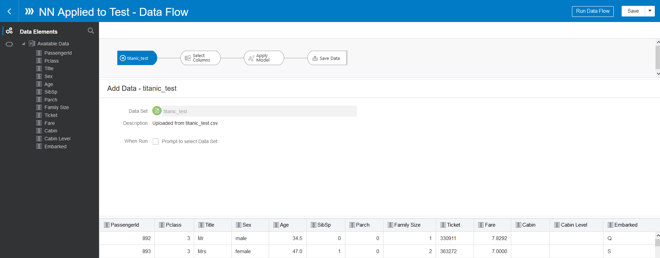
Step 6 – Apply the model: From the home screen create a new Data Flow. This data flow will apply the machine learning model you’ve just created to the test data set. 

The data flow is as follows:
1.    The training data source
2.    Remove any columns not required in the model
3.    Apply the machine learning model
4.    Save the result data set 
When applying the model, you can rename the columns in this example “PredictedValue” is renamed to “Survived”.
Step 7 – Prepare for submission: For the Kaggle competition the file that needs to be uploaded should only contain 2 columns, the PassengerID and Survived (i.e. the predicted values from the model). The resulting data set can be downloaded and then submitted to Kaggle for a score. 
Step 8 – The final frontier: Once you have downloaded the file you can upload the results to Kaggle to get your first Data Science score. 


Let’s get connected: ADW and SQL Developer


In this blog we’re going to discuss how to connect to ADW through SQL developer and upload some data.
Credentials Wallet
Log into your Oracle environment and select the ADW environment that you have provisioned.

The details screen allows you to perform some basic operations with the service, including scale up/down, manual backups and restores from backups. Click on the "Service Console" button.

Example: Scaling Up/Down can be done in the Service Management screen
The administration screen allows you to perform some basic administration of the service, one of which is downloading the Credentials, click the "Download Client Credentials".
When you download the wallet, you will be asked to enter a password to protect the credential store. 

SQL Developer: Getting Connected
Open SQL Developer and create a new connection. 
Use the username and password specified when you provisioned the service. Use a connection type of "Cloud PDB" 
Click the browse..to find the zip file location (downloaded in the previous section) and keystore password you associated with it. You can now click the Test or Connect.


Once connected you should be able to see a list of tables available to you in the ADW environment.